
A distracting background can take attention away from an otherwise great photo. Whether you’re preparing product images for your online store, creating social media graphics, designing marketing materials, or simply editing a personal photo, removing the background is often the first step toward a cleaner, more professional result.
That’s exactly what our Background Remover is designed to do.
Powered by advanced AI, it automatically detects the subject of your image and removes the background in just a few seconds. There’s nothing to install, no design experience required, and no complicated editing tools to learn. Simply upload your image, let the AI handle the hard work, and download a high-quality transparent PNG.
Unlike many free background remover tools, this isn’t just a one-click cutout tool. After removing the background, you can instantly replace it with a solid color, a beautiful gradient, or your own custom image—all without leaving your browser. You can even export your final design in up to 4× HD resolution, making it perfect for websites, online stores, print materials, presentations, and social media.
Whether you need a quick profile picture, professional product photography, or branded marketing graphics, our tool helps you achieve polished results in minutes instead of hours.
What Is a Background Remover?
A Background Remover is an image editing tool that separates the main subject of a photo from everything behind it. Once the background has been removed, the subject is placed on a transparent layer, allowing you to download it as a transparent PNG or place it on any new background.
Only a few years ago, this process required professional editing software and a significant amount of manual work. Designers had to carefully trace around every edge using tools like the Pen Tool or create detailed clipping paths—especially for subjects with fine hair, soft edges, or complex shapes.
Modern AI has changed that completely.
Our tool uses intelligent image segmentation technology trained on millions of real-world photos. It automatically recognizes people, products, pets, vehicles, food, and many other objects, producing a clean cutout in just a few seconds.
What Can You Use It For?
A background remover is useful for almost anyone who works with images, including:
- Product photos for Amazon, Shopify, Etsy, and WooCommerce stores
- Professional profile pictures and LinkedIn headshots
- Social media posts and YouTube thumbnails
- Marketing banners and online advertisements
- School presentations and business documents
- Transparent logos and branding assets
- Print materials such as flyers and brochures
- Creative photo editing projects
Whether you’re editing one image or dozens, automatic background removal saves time while delivering professional-looking results.
Why Removing Image Backgrounds Matters
The background of a photo has a bigger impact than many people realize. Even if your subject is perfectly captured, a cluttered or distracting background can reduce its effectiveness.
Removing unnecessary elements helps direct attention exactly where it belongs.
Better Product Photography
If you sell products online, image quality directly affects customer trust. Clean product photos make listings look more professional and help shoppers focus on the item instead of the surroundings.
Many eCommerce platforms recommend white or transparent backgrounds because they create consistency across product catalogs and improve the overall shopping experience.
Stronger Brand Identity
Consistent visuals help build a recognizable brand.
Replacing different backgrounds with a uniform color or style gives your website, advertisements, social media posts, and marketing materials a polished, professional appearance.
More Engaging Social Media Content
Social media users scroll quickly.
Images with clean backgrounds naturally draw more attention because there are fewer distractions competing with your main subject. Whether you’re creating Instagram posts, Facebook ads, Pinterest graphics, or YouTube thumbnails, removing the background helps your content stand out.
Faster Design Workflow
Graphic designers often spend valuable time isolating subjects before creating advertisements, presentations, or promotional graphics.
AI background removal automates this repetitive task, allowing designers to focus on creativity rather than manual editing.
Professional Marketing Materials
Brochures, flyers, presentations, websites, and email campaigns all benefit from clean visuals.
A well-isolated subject looks more polished, improves readability, and creates a stronger first impression for potential customers.
How Our AI Background Remover Works
We’ve designed the entire process to be simple enough for beginners while producing results that professionals can rely on.
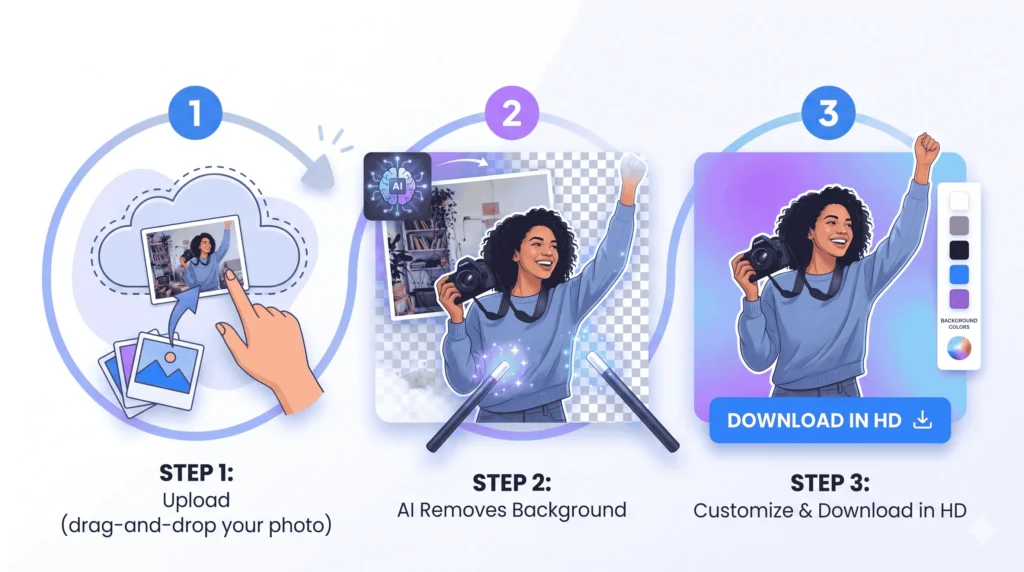
Step 1: Upload Your Image
Drag and drop your image into the upload area or click Browse Image to select a file from your device.
Supported formats include:
- PNG
- JPG
- JPEG
- WEBP
Images up to 10 MB are supported.
Step 2: Let AI Remove the Background
Click Remove Background, and the AI immediately begins analyzing your image.
Within seconds, it:
- Detects the primary subject
- Separates it from the background
- Refines edges for a cleaner cutout
- Creates a transparent PNG
There’s no need to manually outline objects or adjust complicated settings.
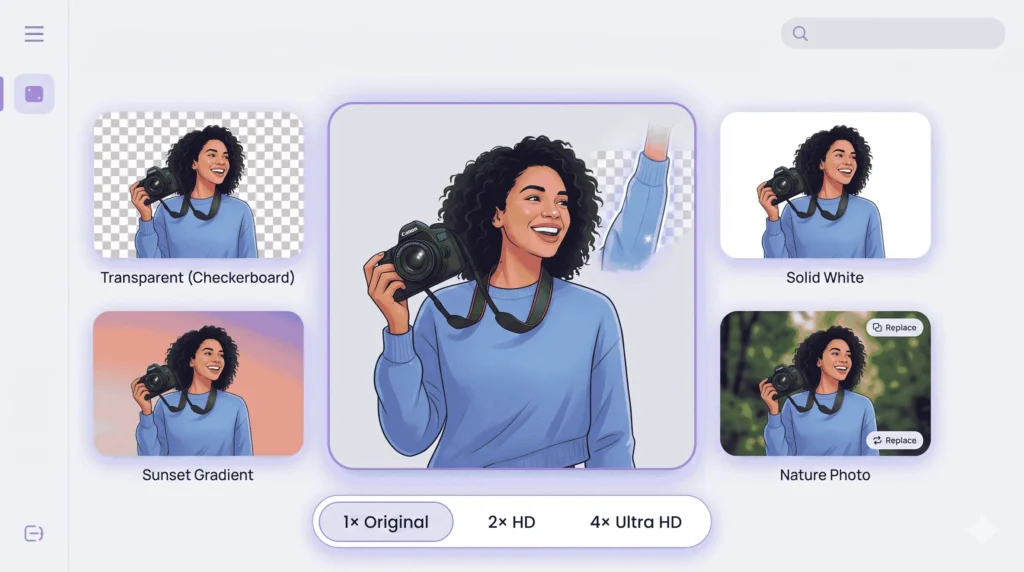
Step 3: Choose a New Background
Once the original background has been removed, you can customize your image by selecting:
- Transparent background
- Solid color background
- Gradient background
- Your own uploaded image
This allows you to create everything from product photos with white backgrounds to eye-catching promotional graphics.
Step 4: Select Your Export Quality
Choose the output quality that best suits your project.
Available options include:
- Original Resolution (1×)
- HD Resolution (2×)
- Ultra HD Resolution (4×)
A live preview displays the exact output dimensions before you download.
Step 5: Download Your Finished Image
Once you’re happy with the result, download your image as a high-quality PNG.
The entire process usually takes less than a minute from upload to download.
Why Choose Our Background Remover?
Many free tools stop after removing the background. Ours gives you everything you need to finish the job without switching between multiple editors.
Transparent PNG Export
Create professional transparent images that are ready for websites, graphic design projects, presentations, or marketing materials.
Solid Color Backgrounds
Choose from preset colors or use the color picker to match your exact brand identity.
Beautiful Gradient Backgrounds
Add modern gradients that instantly improve portraits, advertisements, and social media graphics.
Custom Background Images
Upload your own image and instantly replace the original background with a completely new scene.
HD & Ultra HD Downloads
Export at up to 4× resolution for crystal-clear images suitable for both digital and print use.
Live Preview
Every change updates instantly, allowing you to preview your final design before downloading.
Privacy First
Your uploaded files are automatically deleted after processing, and no registration is required. Your images remain private throughout the editing process.
Works on Any Device
Because the editor runs directly in your browser, you can use it on Windows, macOS, Linux, Android, or iPhone without installing additional software.
Try Our Free AI Background Remover
Now that you know how background removal works, it’s time to try it yourself. Upload your image, let AI remove the background in seconds, replace it with a new background if needed, and download your final image in high quality.