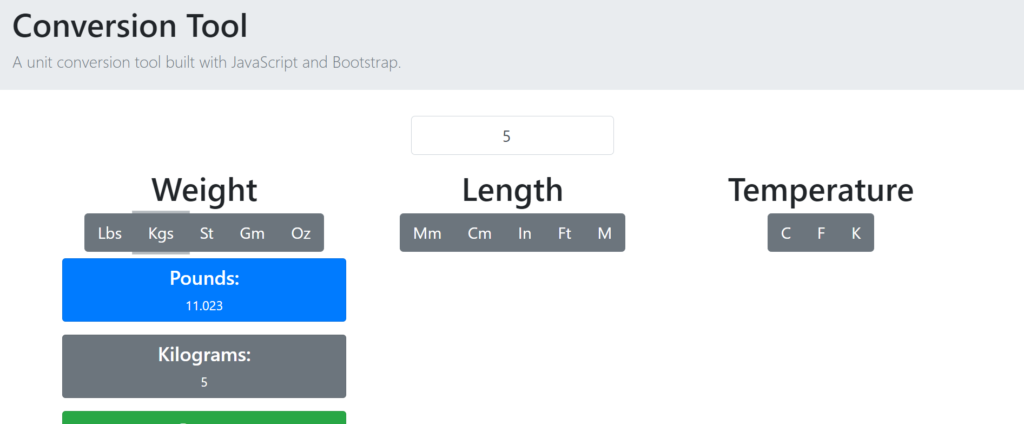
The Conversion Tool is a simple project built with JavaScript, CSS, and HTML. It lets users input a number and see the conversion results for weight, length, and temperature in various units. Whether you need to convert kilograms to pounds, meters to feet, or Celsius to Fahrenheit, this tool gives quick and accurate results. It’s a practical project that shows how basic coding can solve everyday problems easily.
This tool is user-friendly and demonstrates the power of JavaScript for dynamic interactions, CSS for styling, and HTML for content structure. It’s perfect for anyone needing quick conversions or for those learning web development. The Conversion Tool is an excellent example of how simple coding can create useful applications that make life easier.
Technologies:
HTML: Page layout and design
CSS: Design
JavaScript: Frontend
Features:
- Unit Conversion
- Currency Conversion
- Data Conversion
- Customizable Conversion Types
- Interactive UI
- Real-Time Results
- Search and Filter
- Offline Access
- Responsive Design
- Theme Customization
- History and Favorite
- Accessibility Features
Installation:
To run this system, first, open the project in your browser by clicking the index.html file.
To run this project, you don’t need to have any kind of local server but yet a browser.
We recommend you use modern browsers like Google Chrome and Mozilla Firefox.