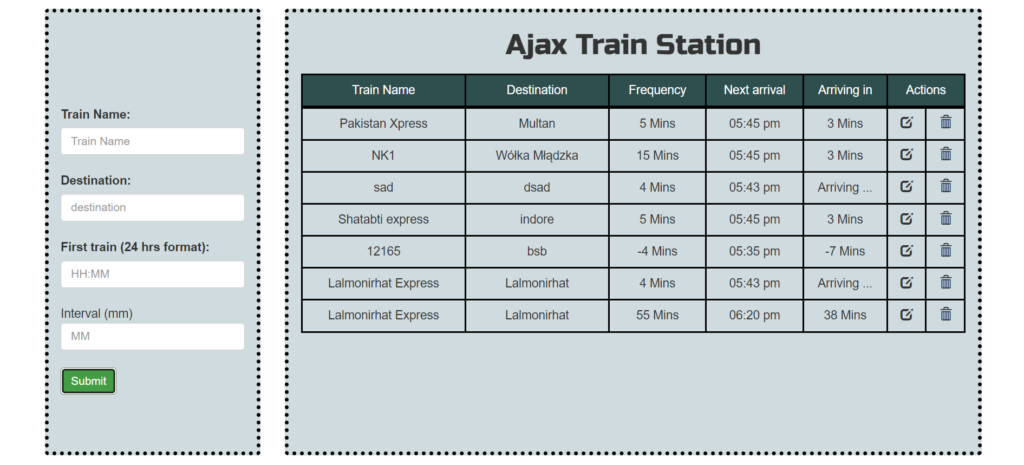
The Train Schedule Manager is a highly practical web application, built using HTML5, CSS, and JavaScript, designed to simplify administrative tasks related to managing train schedules and destinations. This system allows administrators to efficiently handle schedule management through CRUD (Create, Read, Update, Delete) operations, making it easy to add new destinations, update train times, and remove outdated or incorrect information with just a few clicks. The intuitive interface enhances productivity, ensuring that schedules are always accurate and up-to-date.
This project is more than just a scheduling tool; it’s an excellent learning resource for those looking to deepen their understanding of web development and database management. By working with this system, users can gain hands-on experience with essential web technologies, while also learning the importance of structured data management. Furthermore, the project highlights key concepts in responsive design, ensuring that the application functions smoothly across different devices, making it both user-friendly and efficient.
The Train Schedule Manager serves as a foundational step for anyone interested in building user-centric applications that involve managing transportation logistics or any form of time-sensitive data. It offers practical insights into how dynamic data management systems work, providing an opportunity to learn and apply skills that are critical for modern web development.
Technologies:
HTML: Page layout and design
CSS: Design
JavaScript: Frontend
Features:
- Real-Time Schedule Updates
- Interactive Timetable
- Search and Filter
- Station Information
- Dynamic Data Loading
- User Notifications
- Booking Integration (Optional)
- Offline Access
- Responsive Design
- Accessibility Features
- Multiple Language Support
- User Authentication (Optional)
- Schedule Export
Installation:
- To run this system, first, open the project in your browser by clicking the index.html file.
- To run this project, you don’t need to have any kind of local server but yet a browser.
- We recommend you to use modern browsers like Google Chrome and Mozilla Firefox.