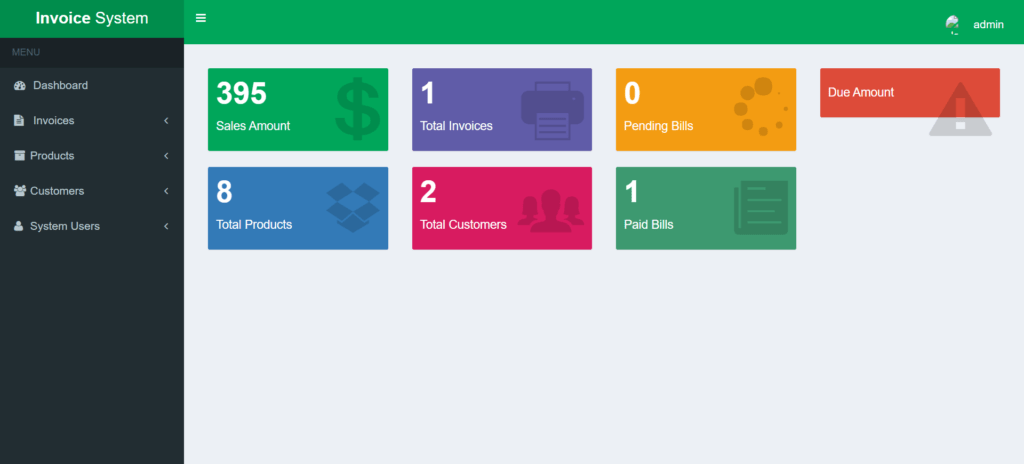
Our invoicing system, built with PHP, CSS, Bootstrap, and JavaScript, offers a comprehensive solution for managing invoices and orders efficiently. The system is designed with two main interfaces: one for users and one for administrators.
User Interface:
- Users can view a detailed list of their orders, including information such as order suffix, date, customer name, address, state, and order amount. This interface provides a clear and organized view of all order details, making it easy to track and manage transactions.
Admin Interface:
- The admin panel provides powerful management tools to oversee the invoicing system. Administrators can access and control various aspects of the system, including monitoring order activity, generating reports, and managing user interactions. This functionality ensures that the system operates smoothly and efficiently.
Key Features:
- Detailed Order Management: Users can easily access and review all their order information.
- Administrative Control: Admins have comprehensive tools for managing and overseeing system operations.
- Modern Design: Developed with current web technologies, the system is both user-friendly and efficient.
This invoicing system is designed to enhance the order management process, providing both users and administrators with a streamlined and effective tool for handling invoices and transactions.
Technologies:
HTML: Page layout and design
CSS: Design
JS: Fontend
PHP: Backend
Bootstrap
Java Script
Supported Operating Systems:
You can run this project in the following operating systems:
Windows
MAC
Linux
Features:
User Registration & Login
Profile Management
Role-Based Access Control
Admin Dashboard
Invoice Creation & Management
Recurring Invoices
Customizable Invoice Templates
Client Management
Product/Service Catalog
Tax Management
Discount Management
Multi-Currency Support
Invoice Emailing
Invoice PDF Generation
Payment Reminders & Notifications
Invoice Status Tracking (Paid, Unpaid, Overdue)
Expense Tracking
Revenue Reports
Payment History
Account Statements
Invoice Archiving
Data Import/Export
Auto-Numbering for Invoices
Credit Note Management
Debit Note Management
About System
Talking about the features of the Invoicing System, the user can simply view total orders which include order suffix, date, customer name, address, state, order amount, and many more. The admin can manage orders, customers, categories, company profiles, and states. It also contains user management for easy management of the system.
The design of this project is pretty simple so that the user won’t find any difficulties while working on it. The invoicing System in PHP helps the user create daily/monthly invoices GST compliant. To run this project you must have installed a virtual server i.e. XAMPP on your PC (for Windows). Invoicing System in PHP with source code is free to download, Use for educational purposes only! For the project demo, have a look at the video below.
Installation:
After Starting Apache and MySQL in XAMPP, follow the following steps
1st Step: Extract file
2nd Step: Copy the main project folder
3rd Step: Paste in xampp/htdocs/
Now Connecting Database
4th Step: Open a browser and go to the URL “http://localhost/phpmyadmin/”
5th Step: Then, click on the databases tab
6th Step: Create a database named “invoicing” and then click on the import tab
7th Step: Click on browse the file and select “invoicing.sql” file which is inside “DATABASE” folder
8th Step: Click on go.
After Creating Database,
9th Step: Open a browser and go to URL “http://localhost/Invoice-System-In-PHP”